> ## Documentation Index
> Fetch the complete documentation index at: https://docs.zionapp.co/llms.txt
> Use this file to discover all available pages before exploring further.
# Audit trail and ACE compliance
> How Zion logs every grading action and what administrators can export for ACE accreditation
Zion writes a record to the grading audit log for every score entry, correction, moderation decision, retest action, override, and reassignment. Administrators use the Audit Log page to investigate a specific score, review moderation compliance, and export evidence for ACE accreditation.
The audit log is administrator-facing. Supervisors and monitors see the moderation queues and alerts covered in [Moderation queue](/features/grading/moderation), but the full Audit Log page is scoped to administrators.
## What gets logged
Every grading action writes a row with an action type drawn from a fixed set:
| Action type | Written when |
| --------------------- | ----------------------------------------------------------------------------------------------------------- |
| Score entered | A test score is entered at [score entry](/features/grading/score-entry) |
| Score adjusted | A rejected score is resubmitted after correction |
| Moderation approved | An external moderator records their mark on an already-finalized score |
| Moderation rejected | An internal moderator rejects a score back to the original grader with a reason |
| Grade finalized | An internal moderator's mark finalizes a score |
| Retest scheduled | A retest is scheduled for a failed test |
| Retest completed | A retest score is entered |
| Admin override | An administrator grants a retest cap override, approves progression, or corrects an already-finalized score |
| Moderation reassigned | An administrator reassigns a pending moderation to another staff member |
Each entry records the student, PACE, the user who performed the action and their role at the time, and the timestamp. Corrections and rejections also record the previous value, the new value, and the reason given, since a reason of at least 10 characters is required for both.
## Viewing the audit log
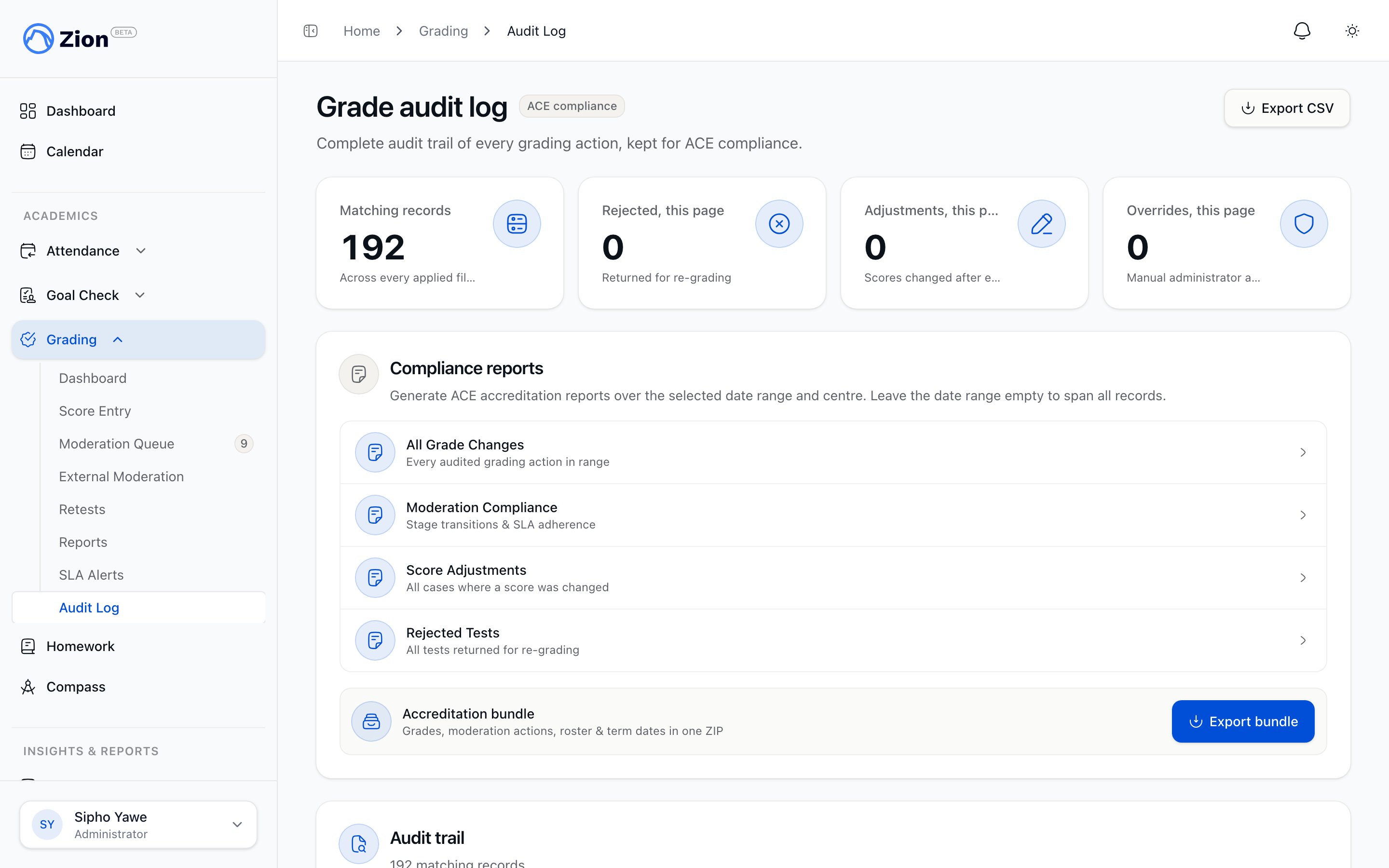 Navigate to Grading, then Audit Log.
Filter by date range, action type, learning centre, performed-by user, or student.
Open a single score to see its full history timeline, from entry through moderation to finalization.
Export the filtered log as a spreadsheet, or generate one of the compliance reports below.
This is the same page you would use to trace a parent-reported score discrepancy: pull the score's history, compare the original entry to the current value, and identify who changed it and why.
## Compliance reports
From the Audit Log page, administrators can generate four report types:
| Report | Covers |
| --------------------- | ---------------------------------------------------- |
| All Grade Changes | Every logged action across the filtered range |
| Moderation Compliance | Moderation decisions and reassignments |
| Score Adjustments | Every corrected or resubmitted score with its reason |
| Rejected Tests | Every rejection and its resolution |
For an ACE inspection, administrators can also generate a one-click accreditation bundle: a downloadable archive containing grades, moderation actions, the student roster, and term dates for the selected period.
## Audit integrity
The Audit Log page shows an audit-integrity verification badge reflecting the result of the latest scheduled tamper check: passed, pending, or tampered rows found. This is the check to look at before submitting an accreditation bundle, since it confirms the underlying log has not been altered outside the normal grading actions.
## Related pages
How test types, thresholds, and moderation fit together
Internal moderation, optional external moderation, and delegated moderators
How scores are entered and routed to moderation
Who can moderate, adjust, and view grading records
Navigate to Grading, then Audit Log.
Filter by date range, action type, learning centre, performed-by user, or student.
Open a single score to see its full history timeline, from entry through moderation to finalization.
Export the filtered log as a spreadsheet, or generate one of the compliance reports below.
This is the same page you would use to trace a parent-reported score discrepancy: pull the score's history, compare the original entry to the current value, and identify who changed it and why.
## Compliance reports
From the Audit Log page, administrators can generate four report types:
| Report | Covers |
| --------------------- | ---------------------------------------------------- |
| All Grade Changes | Every logged action across the filtered range |
| Moderation Compliance | Moderation decisions and reassignments |
| Score Adjustments | Every corrected or resubmitted score with its reason |
| Rejected Tests | Every rejection and its resolution |
For an ACE inspection, administrators can also generate a one-click accreditation bundle: a downloadable archive containing grades, moderation actions, the student roster, and term dates for the selected period.
## Audit integrity
The Audit Log page shows an audit-integrity verification badge reflecting the result of the latest scheduled tamper check: passed, pending, or tampered rows found. This is the check to look at before submitting an accreditation bundle, since it confirms the underlying log has not been altered outside the normal grading actions.
## Related pages
How test types, thresholds, and moderation fit together
Internal moderation, optional external moderation, and delegated moderators
How scores are entered and routed to moderation
Who can moderate, adjust, and view grading records