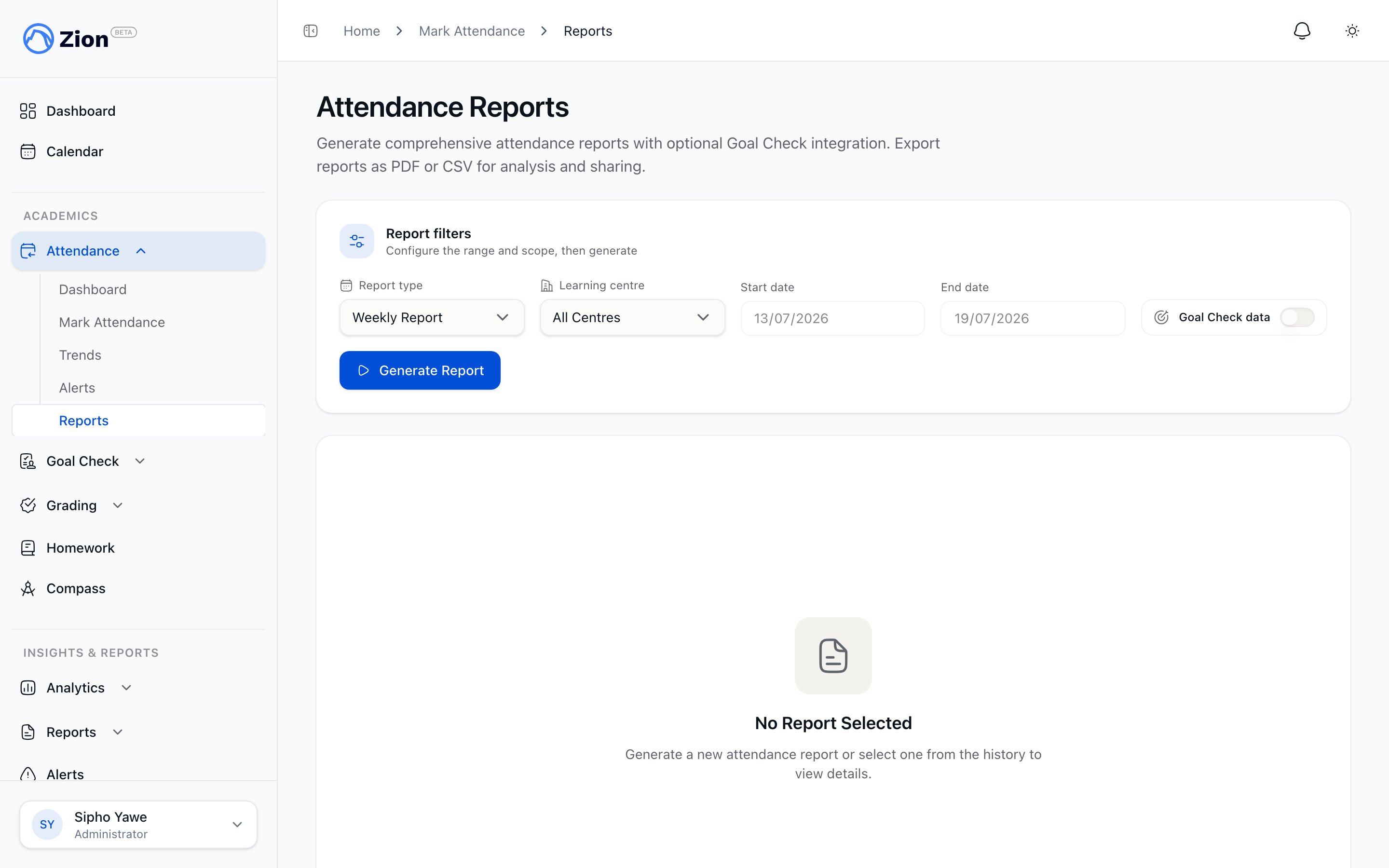
Attendance Reports
Zion provides comprehensive attendance reporting for compliance, analysis, and parent communication. This guide covers report types, generation, and interpretation.Report Types
Daily Report
Scope: Single day attendance summary Contents:- Date and learning centre
- Total students, marked count
- Present/Absent/Late counts
- Attendance rate percentage
- Student-by-student breakdown
- Notes attached to records
- Daily record-keeping
- Parent inquiries about specific days
- Quick compliance checks
Weekly Report
Scope: 7-day period (Monday-Friday typically) Contents:- Week range and centre(s)
- Daily attendance rates
- Weekly average attendance rate
- Day-of-week analysis
- Chronic absence students (that week)
- Late arrival patterns
- Trend compared to previous week
- Weekly supervisor meetings
- Trend identification
- Staff performance review
Monthly Report
Scope: Full calendar month Contents:- Month overview statistics
- Weekly breakdown within month
- Centre comparison (admin view)
- Students with >3 absences
- Late arrival frequency
- Month-over-month trend
- Attendance rate by grade level
- Monthly board reports
- Regulatory compliance
- Parent communication
Term Report
Scope: Full academic term Contents:- Term overview statistics
- Monthly trends within term
- Centre performance ranking
- Chronic absence list (all qualifying students)
- Grade-level analysis
- Subject correlation (with Goal Check data)
- Year-over-year comparison (if data available)
- Term-end reviews
- Academic performance correlation
- Annual reporting
Custom Report
Scope: User-specified date range Contents:- Same comprehensive data as term report
- Flexible date range (any start/end)
- All centre or specific centre
- Optional Goal Check integration
- Specific investigations
- Event impact analysis
- Custom compliance periods
Generating Reports
Access Reports
- Navigate to Attendance in the sidebar
- Click Reports submenu
- Choose report type from the selector
Report Configuration
1
Select Report Type
Choose from Daily, Weekly, Monthly, Term, or Custom
2
Set Date Range
- Daily: Select specific date
- Weekly: Select week start date
- Monthly: Select month
- Term: Select academic term
- Custom: Set start and end dates
3
Choose Centre(s)
- Administrators: Select specific centre or “All Centres”
- Supervisors: Limited to assigned centres
4
Optional: Goal Check Integration
Toggle on to include Goal Check correlation data
5
Generate Report
Click “Generate Report” to create the report
Generation Time
| Report Type | Typical Time |
|---|---|
| Daily | <2 seconds |
| Weekly | <5 seconds |
| Monthly | 5-10 seconds |
| Term | 10-30 seconds |
| Custom (large) | Up to 60 seconds |
Report Contents
Overview Section
Every report includes:- Report Period: Date range covered
- Centre(s) Included: Which learning centres
- Total Students: Active students in scope
- Days Analyzed: School days in period
Attendance Statistics
Core Metrics:| Metric | Calculation |
|---|---|
| Attendance Rate | (Present + Late) / Total Students × 100 |
| Present Count | Students marked as Present |
| Absent Count | Students marked as Absent |
| Late Count | Students marked as Late |
| Unmarked | Students not marked (indicates data gaps) |
Centre Breakdown
For school-wide reports (admin view):- Each centre listed with individual metrics
- Attendance rate per centre
- Ranking by attendance rate
- Visual indicators (green/yellow/red)
Chronic Absence Section
Students meeting chronic criteria:- Student name and grade
- Absence count in period
- Absence rate percentage
- Last known alert status
- Centre assignment
Late Arrival Analysis
Patterns in late arrivals:- Total late arrivals in period
- Average arrival time for late students
- Frequency by day of week
- Repeat late students
Day-of-Week Analysis
Performance by weekday:| Day | Absence Rate | Notes |
|---|---|---|
| Monday | 8.5% | Slightly elevated |
| Tuesday | 4.2% | Baseline |
| Wednesday | 4.0% | Baseline |
| Thursday | 4.3% | Baseline |
| Friday | 7.8% | End-of-week dip |
Goal Check Integration
When enabled, reports include Goal Check correlation:What’s Included
- Attendance vs Goal Completion: Do students who attend more complete more goals?
- Subject Performance by Attendance: Which subjects suffer most with absences
- At-Risk Correlation: Students with both attendance AND goal issues
Interpretation
Positive Correlation Expected:- Higher attendance should correlate with higher goal completion
- If correlation is weak, investigate other factors
- Students with poor attendance AND poor goals need immediate intervention
- Students with good attendance but poor goals may have learning challenges
- Students with poor attendance but good goals may be academically strong but have home issues
Export Options
CSV Export
Click Export CSV to download spreadsheet format: File Contents:- Header row with column names
- One row per student record
- Columns: Name, Number, Grade, Centre, Status, Arrival Time, Notes
- Summary section at bottom with totals
attendance-{date}-{centre-name}.csv
Use Cases:
- Import into Excel/Sheets for further analysis
- Archive for compliance
- Share with external parties
PDF Export
Click Export PDF to download printable format: PDF Contents:- Professional header with school name
- Report type and date range
- Summary statistics with charts
- Student detail table
- Footer with generation timestamp
- Parent meetings
- Board presentations
- Physical filing
- Official documentation
Report History
Viewing Past Reports
- Navigate to Attendance → Reports
- Click Report History tab
- See list of previously generated reports
- Click any report to view or re-download
History Includes:
- Report type and date range
- Centre(s) included
- Generation timestamp
- Generated by (user name)
- Quick download links (CSV/PDF)
Retention
Reports are stored for the current academic year. Older reports may be archived.Best Practices
Regular Reporting Schedule
| Frequency | Report Type | Audience |
|---|---|---|
| Daily | Daily Report | Supervisor internal use |
| Weekly | Weekly Report | Staff meetings, trend review |
| Monthly | Monthly Report | Principal, board |
| Quarterly | Term Report | Regulatory compliance, parents |
Before Generating
- Ensure all attendance is marked for the period
- Check for data gaps (unmarked students)
- Verify centre assignments are current
After Generating
- Review for anomalies or data issues
- Share with appropriate stakeholders
- Archive for compliance records
- Set calendar reminder for next report
Troubleshooting
Report Shows Gaps
Symptom: Some students show “Unmarked” status Cause: Attendance was not entered for those students/dates Solution:- Cannot fix past unmarked attendance (after midnight cutoff)
- Note in report distribution that data is incomplete
- Improve daily marking compliance going forward
Low Attendance Rate Unexpected
Symptom: Rate seems lower than reality Check:- Were all students marked?
- Were late students marked as “Late” not “Absent”?
- Were there school holidays in the period?
Export Not Downloading
Possible Causes:- Pop-up blocker preventing download
- Large report still generating
- Network timeout
- Disable pop-up blocker for Zion
- Wait for generation to complete
- Try a smaller date range
- Refresh and retry