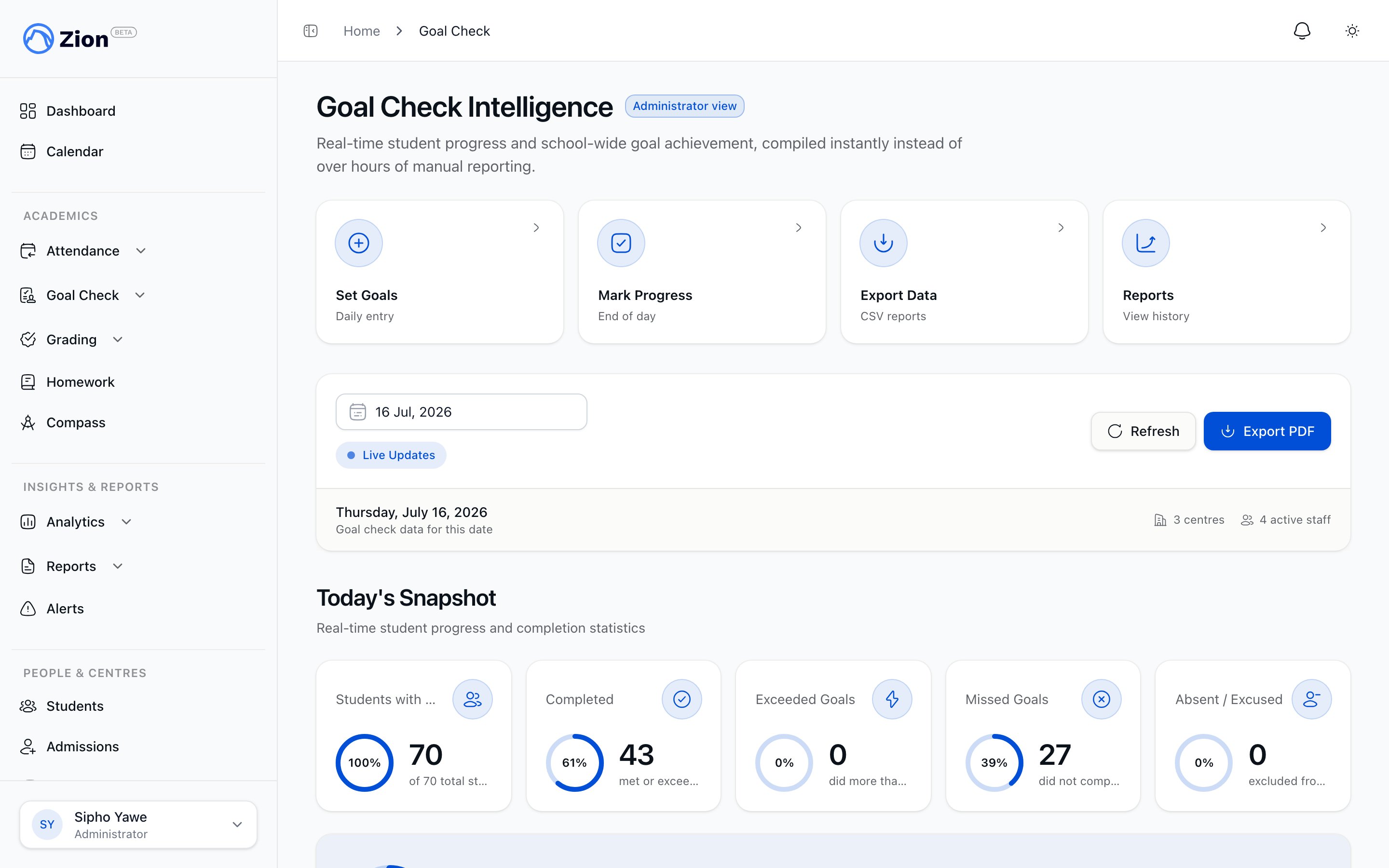
Goal Check Intelligence Overview

Goal Check is the heart of Zion - transforming ACE’s daily goal-setting methodology from hours of manual compilation into less than 1 minute of automated intelligence.

What is Goal Check?

In ACE schools, students set daily page goals for each PACE they’re working on. At end of day, supervisors check if students met their goals. This “Goal Check” process provides accountability and progress tracking. Traditional Goal Check (Manual):
  • Supervisors track goals on paper or whiteboards
  • End of day: Manually compile completion data
  • Create handwritten or typed summaries
  • Time required: 2-3 hours per day
  • Result: Limited insights, prone to errors, difficult to track trends
Zion Goal Check (Automated):
  • Digital goal entry (5 minutes in morning)
  • Real-time progress tracking throughout day
  • Automated progress marking (5 minutes at end of day)
  • One-click report generation (<30 seconds)
  • Time required: ~10 minutes per day
  • Result: Rich insights, 100% accurate, trend analysis, predictive alerts
Time Saved: 2-3 hours → 10 minutes = 10+ hours saved per week

How Goal Check Works in Zion

Morning: Goal Setting

Who: Supervisors or Monitors Where: Goal Check → Set Goals Time: 5 minutes for 20 students
  1. Select today’s date
  2. For each student and PACE, enter:
    • Goal start page (e.g., 15)
    • Goal end page (e.g., 20)
    • Goal total pages (auto-calculated: 6 pages)
  3. Goals auto-save as you type
  4. Navigate away when done
Features:
  • Copy previous day’s goals as template
  • Standard goal templates by grade level
  • Validation prevents invalid page ranges
  • Tablet-optimized for on-the-go entry

Throughout the Day: Real-Time Monitoring

Who: Administrators and Supervisors Where: Dashboard Time: 30 seconds for quick check Administrator Dashboard Shows:
  • School-wide completion status
  • Total students with goals set today
  • Real-time completion % as goals are marked
  • Which centres need attention
  • At-risk students
Supervisor Dashboard Shows:
  • My centres’ completion status
  • Student-by-student progress table
  • Real-time updates as I mark progress
  • Alerts for my students
  • My centres’ 7-day trends

End of Day: Progress Marking

Who: Supervisors or Monitors Where: Goal Check → Mark Progress Time: 5 minutes for 20 students
  1. Select today’s date
  2. For each student and PACE:
    • View goal pages (set this morning)
    • Enter actual start page completed
    • Enter actual end page completed
    • System calculates actual total pages
    • System shows variance (actual vs goal)
  3. Add optional notes for struggling students
  4. Progress auto-saves
Completion Logic:
  • Completed: Actual pages ≥ goal pages (met or exceeded)
  • Missed: Actual pages < goal pages (fell short)
  • Exceeded: Actual pages > goal pages (did extra)
Variance Examples:
  • Goal: 6 pages, Actual: 6 pages = 0 variance (met exactly)
  • Goal: 6 pages, Actual: 8 pages = +2 variance (exceeded by 2)
  • Goal: 6 pages, Actual: 4 pages = -2 variance (missed by 2)

Report Generation

Daily Centre Reports:
  • Generated when all students in a centre are marked
  • Shows: centre summary, student-by-student breakdown, at-risk students
  • Export: PDF and CSV formats
  • Time: <30 seconds to generate
Weekly School Reports:
  • Generated for whole school across full week
  • Shows: school summary, daily breakdown, centre comparison, subject analysis, at-risk students, trend indicators
  • Export: PDF and CSV formats
  • Time: <1 minute to generate for 200-student school

Key Features

1. Real-Time Dashboards

Administrator Dashboard:
  • Today’s school-wide snapshot
  • Weekly trends visualization (last 7 days)
  • Centre comparison (which centres performing well)
  • At-risk alerts
  • Quick actions to all features
Supervisor Dashboard:
  • My centres’ snapshot
  • Student progress table with real-time updates
  • My centres’ trends (last 7 days)
  • My alerts (students in my centres)
  • Daily report readiness status

2. Automated Reporting

Daily Centre Reports:
  • Centre-level performance summary
  • Student-by-student detail
  • At-risk student identification
  • PDF and CSV export
Weekly School Reports:
  • Whole-school summary
  • Daily breakdown (Mon-Fri)
  • Centre comparison (ranked)
  • Subject analysis
  • At-risk students
  • Trend indicators (current vs previous week)

3. Variance Tracking

Unlike simple yes/no completion, Zion tracks how much students missed or exceeded goals:
  • Positive Variance (+2): Student did 2 more pages than goal
  • Zero Variance (0): Student met goal exactly
  • Negative Variance (-2): Student did 2 fewer pages than goal
This granular data enables:
  • Trend analysis (is student improving or declining?)
  • Goal adjustment (are goals too high/low?)
  • Intervention planning (which students need support?)

4. At-Risk Student Alerts

Zion automatically identifies students needing intervention: Alert Criteria:
  • 3+ consecutive days missing goals
  • Declining trend (performance dropping >20% over 2 weeks)
  • Subject-specific struggle (consistently missing in one subject)
Alert Display:
  • Dashboard alerts section
  • Color-coded severity (critical vs warning)
  • Recommended actions
  • Historical trend data

5. Data Export

Export all Goal Check data for:
  • Custom analysis in Excel
  • Integration with other systems
  • Long-term archiving
  • ACE accreditation reporting
Export Options:
  • CSV format with all fields
  • Flexible filters (date range, centre, student, status, subject)
  • Complete audit trail included
  • Large exports processed as background jobs

Benefits

For Administrators

Time Savings:
  • 10+ hours per week reclaimed from manual compilation
  • Instant school-wide intelligence
  • One-click report generation
Better Decision Making:
  • Data-driven insights (not gut feel)
  • Early identification of struggling students/centres
  • Trend analysis shows what’s working
Compliance:
  • Complete audit trail for ACE reviews
  • Professional reports for board meetings
  • Historical data always accessible

For Supervisors

Simplified Workflow:
  • 10 minutes per day (vs hours)
  • Tablet-optimized for on-the-go
  • Auto-save prevents data loss
Better Student Support:
  • Identify struggling students early
  • Real-time progress monitoring
  • Data helps plan interventions
Professional Reporting:
  • Generate centre reports instantly
  • Share performance with administration
  • Document centre success

For Students

Clear Expectations:
  • Know exactly what’s expected each day
  • See their progress in real-time (student portal coming)
  • Accountability drives completion
Individualized Pace:
  • Goals adjusted to student ability
  • Not one-size-fits-all
Early Support:
  • Struggling students identified quickly
  • Interventions happen before falling seriously behind

Best Practices

Goal Setting

  1. Start Achievable: Better to set lower goals students can meet than high goals they’ll consistently miss
  2. Use Previous Day: Copy yesterday’s goals as starting point, adjust based on completion
  3. Consider PACE Difficulty: Some sections harder than others - adjust accordingly
  4. Student Ability Matters: Advanced students can handle more pages, struggling students need fewer

Progress Marking

  1. Mark Daily: Don’t let marking pile up - daily marking enables trend tracking
  2. Add Notes: Always note why student struggled (helps plan interventions)
  3. Be Honest: Enter actual pages completed, not what you wish they completed
  4. Review Variance: Use variance data to adjust future goals

Reporting

  1. Daily Check: Glance at dashboard daily (30 seconds)
  2. Weekly Deep Dive: Generate and analyze weekly report every Friday
  3. Share Insights: Distribute reports to leadership and supervisors
  4. Plan Interventions: Use at-risk data to proactively support students

Common Questions

Q: Do I have to set goals every day?
A: Yes, for the system to work. But it only takes 5 minutes with copy-previous-day feature.
Q: What if a student completes different pages than their goal?
A: Enter the actual pages they completed. Variance will reflect the difference.
Q: Can I change goals after setting them?
A: Yes, goals are editable until you mark progress.
Q: What if I forget to mark progress one day?
A: You can go back and mark any past date. Historical data is preserved.
Q: How do I know which students need intervention?
A: Check At-Risk Alerts on dashboard - students with 3+ consecutive misses are flagged.