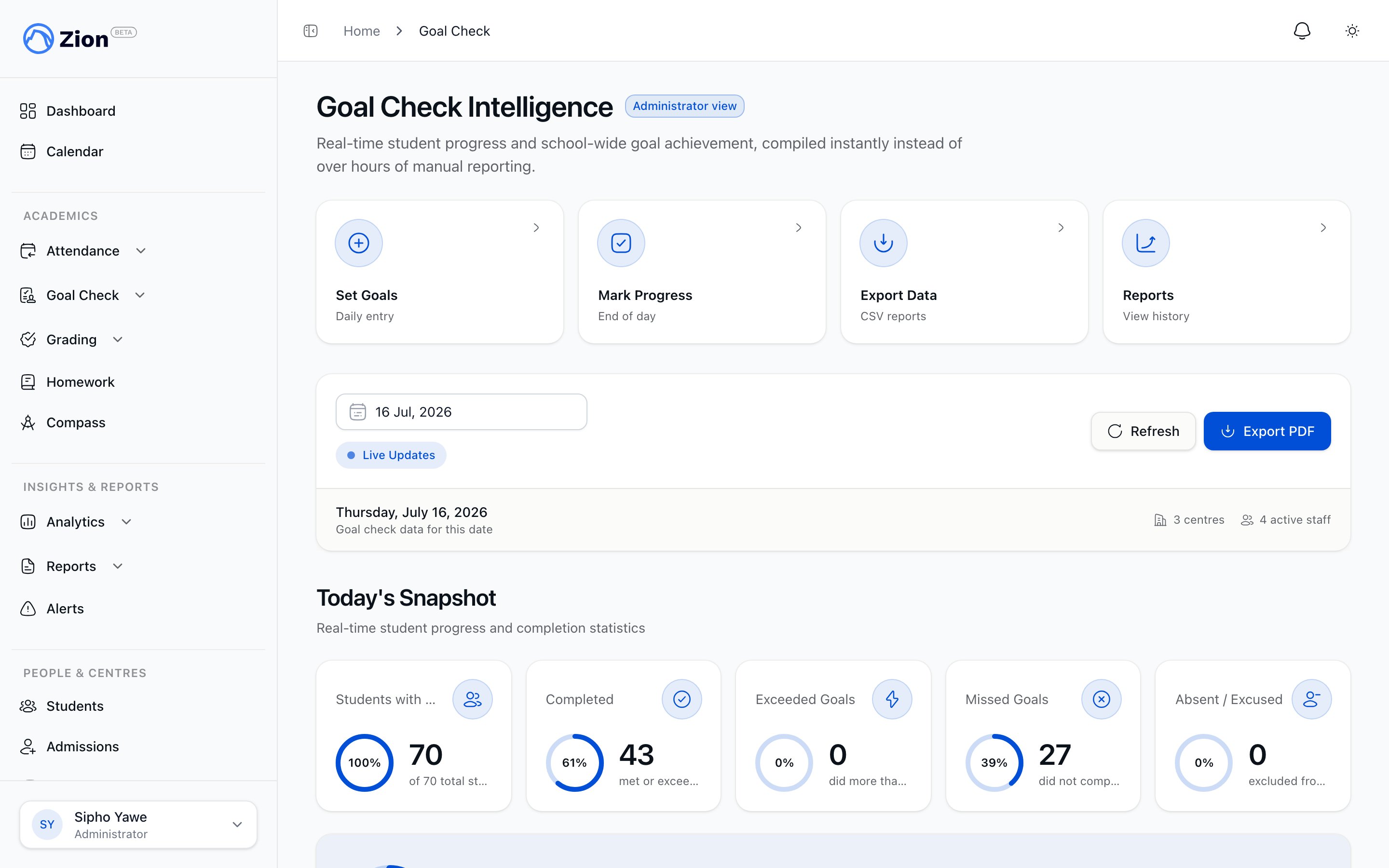
Administrator Goal Check Oversight
As an administrator, you oversee Goal Check across your entire school - not entering daily data, but monitoring performance, identifying trends, and planning interventions. This guide shows you how to use Zion’s Goal Check intelligence features for school-wide oversight.Delegation Note: Administrators typically do NOT enter daily goals or mark progress. That’s handled by supervisors and monitors. Your role is oversight and strategic intervention.
Your Goal Check Responsibilities
As administrator, your Goal Check workflow focuses on: Daily (2 minutes):- Review school-wide completion metrics on dashboard
- Check at-risk student alerts
- Verify all centres have active goal entry/marking
- Generate and analyze weekly school reports
- Compare centre performance
- Plan interventions for struggling students/centres
- Share insights with leadership team
- Analyze cumulative trends across multiple weeks
- Evaluate subject performance patterns
- Assess supervisor/centre effectiveness
- Prepare reports for board/leadership
Administrator Dashboard Deep Dive
Access Your Dashboard
- Log into Zion
- Click “Dashboard” in sidebar
- You’ll see the Administrator Dashboard (different from Supervisor Dashboard)
Dashboard Sections Explained
Today’s Snapshot (KPI Cards)
Total Students:- Shows count of all active students in your school
- Click card to view student roster
- Excludes deactivated students
- Percentage of students who met or exceeded goals today
- Formula: (Students Completed + Students Exceeded) / Total Students × 100
- Updates in real-time as supervisors mark progress
- Color-coded:
- Green (≥80%): Excellent performance
- 🟡 Yellow (50-79%): Needs attention
- Red (<50%): Urgent intervention needed
- Total count of active centres
- Click card to manage centres
- Count of at-risk students requiring intervention
- Click card to see at-risk student list with details
- Updated daily based on alert criteria
Weekly Trends Chart
What It Shows:- Line graph of last 7 days completion rates
- X-axis: Days of week (Mon-Sun)
- Y-axis: Completion percentage (0-100%)
- Trend line shows if performance improving or declining
- Line slopes upward over the week
- Indicates: Good momentum, effective strategies, student engagement increasing
- Action: Document what’s working, maintain current approach
- Line slopes downward over the week
- Indicates: Students struggling, possible burnout, goals too high
- Action: Investigate root causes, consider goal adjustments, provide additional support
- Line relatively horizontal
- Indicates: Consistent performance (good if high, concerning if low)
- Action: If high (80%+), maintain. If low (<50%), intervene immediately.
- Common pattern: completion drops on Fridays
- Indicates: End-of-week fatigue
- Action: Consider lower Friday goals or more engaging activities
Centre Performance Section
What It Shows:- List of all active learning centres
- Each centre shows:
- Centre name
- Today’s completion rate
- Color-coded badge (green/yellow/red)
- Student count in centre
- Quick Scan: Glance at badge colors to identify struggling centres
- Click Centre: View detailed centre breakdown and student list
- Compare Centres: Identify top performers and struggling centres
- Plan Support: Assign resources to centres with red/yellow badges
- Supervisor effectiveness
- Student composition (ability levels)
- PACE difficulty in that centre
- Centre size (larger centres often have more variation)
My Alerts Section
Alert Types: Consecutive Missed Goals:- Students who missed goals 3+ days in a row
- Severity: Critical (requires immediate intervention)
- Shows: Student name, days missed, current centre
- Students whose completion dropped >20% over 2 weeks
- Severity: Warning (monitor closely)
- Shows: Student name, trend percentage, current completion
- Students consistently missing goals in one subject
- Severity: Warning (may need curriculum support)
- Shows: Student name, subject, recent performance
1
Click Alert to View Details
See student’s complete Goal Check history and variance patterns
2
Analyze Root Cause
Review notes from supervisors, check PACE difficulty, consider student circumstances
3
Plan Intervention
Lower goals, assign peer tutor, provide one-on-one support, adjust PACE assignment
4
Coordinate with Supervisor
Inform student’s supervisor of intervention plan and monitor results
5
Track Progress
Check dashboard daily to see if intervention is working
Interpreting School-Wide Metrics
What “Good” Looks Like
Daily Completion Rate:- Target: 80-90% school-wide
- Acceptable: 70-79%
- ⚠️ Concerning: 60-69%
- 🚨 Critical: <60%
- Target: <5% of total students
- Acceptable: 5-10%
- ⚠️ Concerning: 10-15%
- 🚨 Critical: >15%
- Target: All centres within 15% of each other
- ⚠️ Concerning: 30%+ spread between best and worst centre
- Indicates: Supervisor effectiveness issues or unbalanced student placement
Red Flags Requiring Immediate Action
School-Wide Completion <60% for 3+ Days:- Indicates: Goals too high, systemic issue, widespread burnout
- Action: Emergency meeting with supervisors, immediate goal adjustment review
- Indicates: Supervisor issue, centre composition problem, or extreme PACE difficulty
- Action: One-on-one with centre supervisor, student interviews, consider reassignments
- Indicates: External factor (event, illness outbreak), data entry error, or system issue
- Action: Investigate cause immediately, verify data accuracy
- Indicates: Interventions not working, goals systematically too high
- Action: Review alert list, assess intervention effectiveness, consider school-wide goal recalibration
Weekly School Reports
Generating Weekly Reports
1
Navigate to Reports
Click “Reports” → “Weekly School Reports” in sidebar
2
Select Week Range
Choose start date (Monday) and end date (Friday) for the week
3
Generate Report
Click “Generate Weekly Report” - takes ~30 seconds for 200-student school
4
Review On-Screen
Scroll through report sections before downloading
5
Download
Export as PDF (for sharing) or CSV (for analysis)
Report Contents & Interpretation
School Summary Section:- Total students, total centres, date range
- Week’s overall completion rate
- Comparison to previous week (↑ improved, ↓ declined, → same)
- Total goals set vs goals met
- Average variance across all students
- Monday through Friday completion rates
- Shows patterns (e.g., Friday dips, Monday struggles)
- Use to identify problematic days of week
- All centres ranked by completion rate (best to worst)
- Shows each centre’s:
- Completion rate for the week
- Student count
- Goals set vs met
- Average variance
- Use to identify top-performing and struggling centres
- Completion rates broken down by subject
- Shows which subjects students struggle with most
- Example: If Math consistently 20% lower than other subjects, indicates curriculum issue
- Use to plan targeted interventions or curriculum adjustments
- Complete list of students needing intervention
- Shows: Name, centre, days missed this week, trend indicator
- Use to plan individual student interventions
- Visual arrows showing improvement/decline vs previous week
- Helps identify if interventions are working
Weekly Report Use Cases
Leadership Meeting (Every Monday):- Share previous week’s report with leadership team
- Discuss performance trends
- Plan school-wide initiatives based on data
- Send weekly report to all supervisors
- Highlight areas for improvement
- Celebrate centres with excellent performance
- Compile 4-week or 12-week reports
- Show cumulative trends
- Document school performance for governance
- Demonstrate systematic Goal Check implementation
- Show data-driven decision making
- Provide evidence of student progress tracking
At-Risk Student Intervention Strategies
Tier 1: Lower Goals
When to Use:- Student consistently missing by 2-3 pages
- Pattern: Effort is there, goals just too high
- Identify average pages student completes daily (e.g., 4 pages)
- Set new goals slightly above average (e.g., 5 pages)
- Monitor for 1 week
- Gradually increase as student succeeds
Tier 2: One-on-One Support
When to Use:- Student struggling with specific subject/concept
- Pattern: Completes some PACEs fine, struggles with one
- Assign supervisor or peer tutor for 30 min/day
- Focus on the struggling subject
- Re-teach concepts as needed
- Continue until student catches up
Tier 3: PACE Reassignment
When to Use:- PACE is too difficult for student’s current level
- Pattern: Student completely lost, not making any progress
- Assess student’s true level with diagnostic test
- Reassign to appropriate PACE level (may be 1-2 levels lower)
- Set achievable goals at new level
- Build up gradually
Tier 4: Schedule/Workload Adjustment
When to Use:- Student overloaded (too many PACEs)
- Pattern: Missing goals across ALL subjects consistently
- Reduce total PACEs from 6 to 4
- Focus on core subjects (Math, English, Science)
- Lower daily page goals across the board
- Gradually increase workload as student stabilizes
Tier 5: External Support
When to Use:- Interventions 1-4 not working
- Pattern: Persistent struggle despite adjustments
- Meeting with parents to discuss challenges
- Assess for learning disabilities or external factors
- Consider professional educational assessment
- Develop individualized education plan if needed
Centre Performance Analysis
Comparing Centre Performance
Why Centres Differ: Supervisor Effectiveness (30-40% of variance):- Experienced supervisors set better goals
- Strong classroom management = better completion
- Engaged supervisors = more student support
- Centre with advanced students performs better
- Centre with many struggling students performs worse
- Age/grade mix affects dynamics
- Some PACE subjects inherently harder (e.g., advanced Math)
- Centres with harder PACEs may have lower completion
- Smaller centres (10-15 students) often perform better
- Larger centres (25+) harder to manage
Identifying Top-Performing Centres
Characteristics:- Consistent 85%+ completion
- Low at-risk count
- Positive week-over-week trends
- Low variance between students (all succeeding)
- Interview supervisor: What strategies work?
- Observe classroom: What’s different?
- Document best practices
- Share with other supervisors
- Feature centre in staff meetings
- Document supervisor’s approach
- Use as mentors for struggling supervisors
Supporting Struggling Centres
Characteristics:- Consistent <60% completion
- High at-risk count
- Declining trends
- High variance (some students thriving, many struggling)
1
Diagnose Root Cause
Meet with supervisor to understand challenges. Review student composition and PACE difficulty.
2
Observe Classroom
Spend 1-2 hours observing goal entry and student work. Note inefficiencies or issues.
3
Action Plan
Based on diagnosis: Lower goals school-wide in that centre, reassign students to balance ability levels, provide supervisor training/mentoring, adjust PACE assignments.
4
Pair with Top Centre
Have struggling supervisor shadow top-performing supervisor for 1 week.
5
Monitor Progress
Check centre’s dashboard daily for 2 weeks. Look for improvement. If no improvement, consider supervisor reassignment or centre restructure.
Data-Driven Decision Making
Using Variance Data
Positive Variance Patterns:- Consistent +2 to +4 across all students in a centre
- Indicates: Goals too easy, students not challenged
- Action: Gradually increase goals by 1-2 pages
- Consistent -2 to -4 across all students in a centre
- Indicates: Goals too high, students discouraged
- Action: Immediately lower goals by 2-3 pages
- Some students +5, others -5 in same centre
- Indicates: Goals not individualized enough
- Action: Set different goals per student based on ability
Subject Performance Analysis
Example Scenario:- Math: 65% completion
- English: 85% completion
- Science: 80% completion
- Social Studies: 82% completion
- Math significantly lower than other subjects
- Pattern consistent across multiple centres
- Indicates: Math PACEs too difficult OR Math instruction needs improvement
- Review Math PACE levels for all students (are they appropriate?)
- Provide Math-specific training for supervisors
- Consider peer tutoring for Math
- Lower Math-specific goals until students stabilize
Trend Analysis for Strategic Planning
Month-Over-Month Trends:- Plot completion rates for 3-4 months
- Identify long-term patterns
- Example: If completion declines every term, indicates need for mid-term break or workload reduction
- Compare Term 1 2025 to Term 1 2024
- Shows if school improving overall
- Useful for board reporting and strategic planning
Best Practices for Administrators
Daily Routine (2 minutes)
- Open administrator dashboard
- Note today’s completion % (target: >80%)
- Check at-risk count (target: <5% of students)
- Scan centre performance badges (all green?)
- Review any critical alerts
- Address urgent issues immediately
Weekly Routine (15 minutes)
- Generate weekly school report every Friday
- Analyze:
- Overall completion vs last week (improving?)
- Centre comparison (any centres struggling?)
- Subject performance (any subjects lagging?)
- At-risk list (who needs intervention?)
- Share report with supervisors and leadership
- Plan interventions for next week
Monthly Routine (30 minutes)
- Generate reports for all 4 weeks of the month
- Analyze cumulative trends
- Evaluate intervention effectiveness
- Assess supervisor performance
- Plan curriculum adjustments if needed
- Prepare board/leadership report
Communication Cadence
Daily:- Quick check-ins with supervisors in struggling centres
- Address any urgent at-risk alerts
- Email weekly report to all supervisors
- Highlight successes and areas for improvement
- Share leadership insights
- Staff meeting to review cumulative data
- Celebrate top-performing centres
- Provide training for struggling supervisors
- Share strategic initiatives based on data
Troubleshooting Common Issues
”Dashboard Shows 0% Completion”
Possible Causes:- No goals set today yet (morning)
- No progress marked yet (throughout day)
- All centres inactive
- Wrong active term selected
”Weekly Report Shows No Data”
Possible Causes:- Selected week has no Goal Check data
- Week range includes future dates
- Active term doesn’t cover selected week
”Completion Rate Suddenly Dropped”
Possible Causes:- Goals increased too much
- Supervisor absent (substitute not setting goals properly)
- External event (field trip, illness outbreak)
- Data entry error
”At-Risk Count Keeps Growing”
Possible Causes:- Interventions not effective
- Goals systematically too high
- Curriculum too difficult
- Lack of follow-through on interventions
Related Resources
Reports Guide
Deep dive into daily and weekly report generation
Setting Goals
Goal entry best practices and templates
Marking Progress
Progress marking workflow and variance tracking
Data Export
Export Goal Check data for custom analysis
Student Management
Managing student roster and PACE assignments
Learning Centres
Creating and managing learning centres