

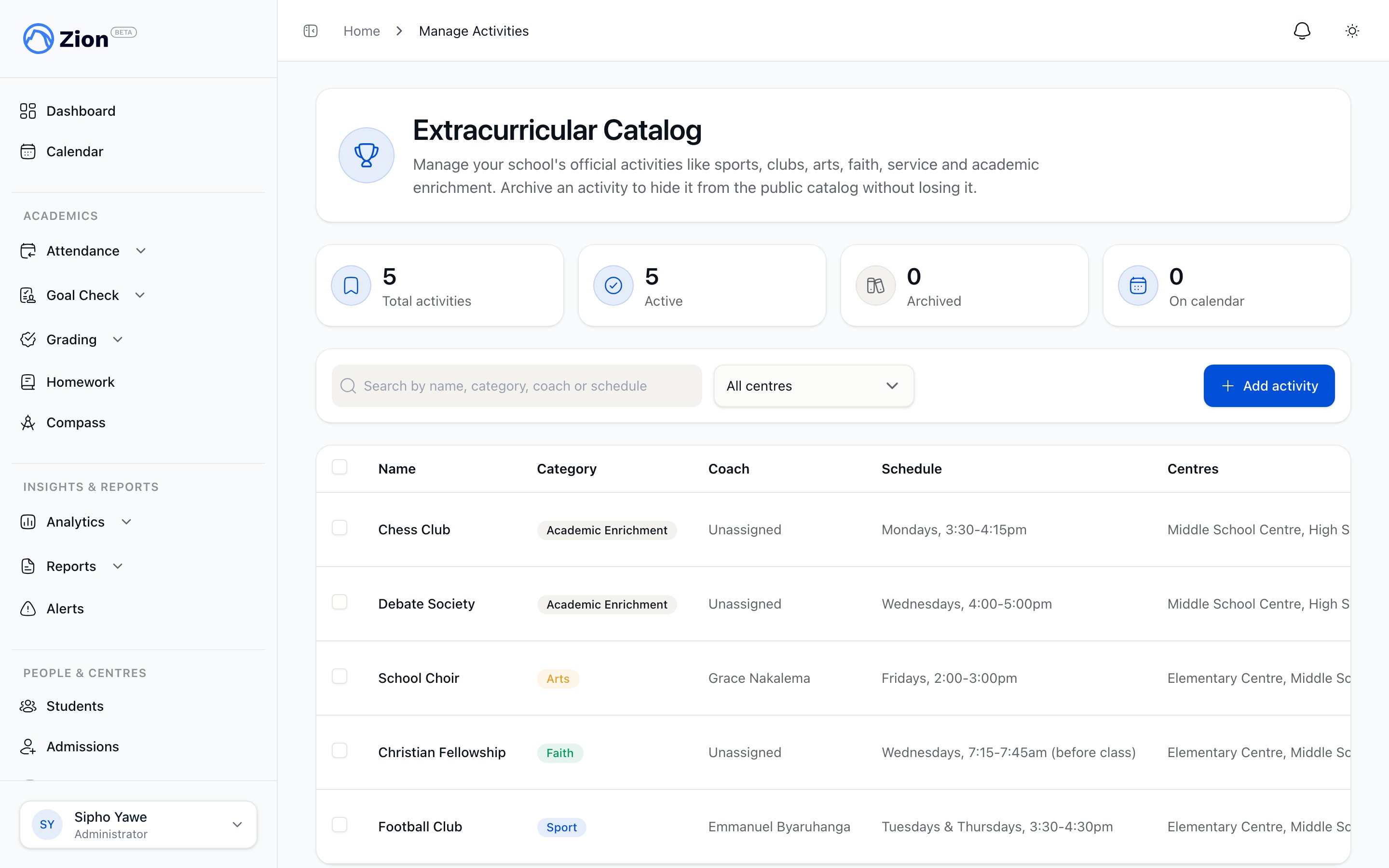
The extracurricular activity catalog with category and schedule for each entry
This is a catalog and calendar feature, not a registration system. There is no seat count, waitlist, fee collection, or consent form anywhere in extracurriculars. Registering interest tells staff that a family wants to know more. It does not sign anyone up.
What an activity is
Every activity has a name, an optional description, and one of six fixed categories:
Each activity also carries a required schedule summary (free text, up to 300 characters) describing when and where it happens in plain language, and an active/inactive toggle.
Two fields are optional on every activity:
- Person in Charge: a staff member (administrator, supervisor, or monitor) assigned to run it. Zion checks that the person is an active member of your school before saving.
- Learning centre scope: one or more learning centres the activity belongs to. Leaving this empty makes the activity org-wide, visible everywhere.
Calendar recurrence is optional
An activity can also carry an optional recurrence: a repeat preset (daily, weekly on weekdays, weekly on selected days, or monthly), a start time, and a duration. Setting a preset puts the activity on the school calendar and on the school’s ICS calendar feed. Leaving the preset unset keeps the activity catalog-only, with no calendar event. Anyone can also generate a personal ICS subscription link scoped to extracurricular events, either for the whole catalog or for a single activity, using the same signed-link mechanism as the main school calendar feed.School calendar
See how extracurricular events sit alongside terms, exams, and other school events on the calendar.
Who sees what
Visibility follows organization and learning-centre scope:
Only administrators can see archived (inactive) activities in the catalog. Everyone else sees active activities only.
Managing the catalog
Administrators manage the full org-wide catalog, including archiving, restoring, and deleting activities. Supervisors can create and edit activities for their own learning centres and must target at least one centre when creating one: a supervisor cannot create an org-wide activity, and cannot archive, restore, or delete an activity. Any staff member assigned as the person in charge of an activity can view it under “Activities I run” and edit its schedule summary and recurrence, but not its name, category, person in charge, centre scope, or active status.Managing the activity catalog
Creating, editing, archiving, and bulk-managing activities as an administrator or supervisor.
Non-binding interest
Parents and students browse the catalog and can register interest in an activity. A parent may optionally attach one of their own children to the interest. A student’s interest is tied automatically to their own student record. Interest can be withdrawn at any time. Registering interest sends a notification to the activity’s person in charge and to administrators. Staff see an active-interest count on each activity and can open a read-only list of everyone who registered, along with a Catalog Report that rolls up totals by category, by learning centre, activities with no person in charge assigned, and the activities with the most interest.Interest and reports
How families register and withdraw interest, and how staff read demand through the catalog report.
What extracurriculars does not do
- No enrolment or roster of who is signed up to attend
- No attendance tracking for activity sessions
- No capacity, seat limits, or waitlists
- No fees, payments, or billing tied to an activity
- No consent forms or approval workflow
Managing the catalog
Create, edit, archive, and bulk-manage activities.
Interest and reports
Register interest, view demand, and read the catalog report.
School calendar
See how recurring activities appear on the calendar.
Calendar ICS subscription
Subscribe to school and activity events from an external calendar app.