

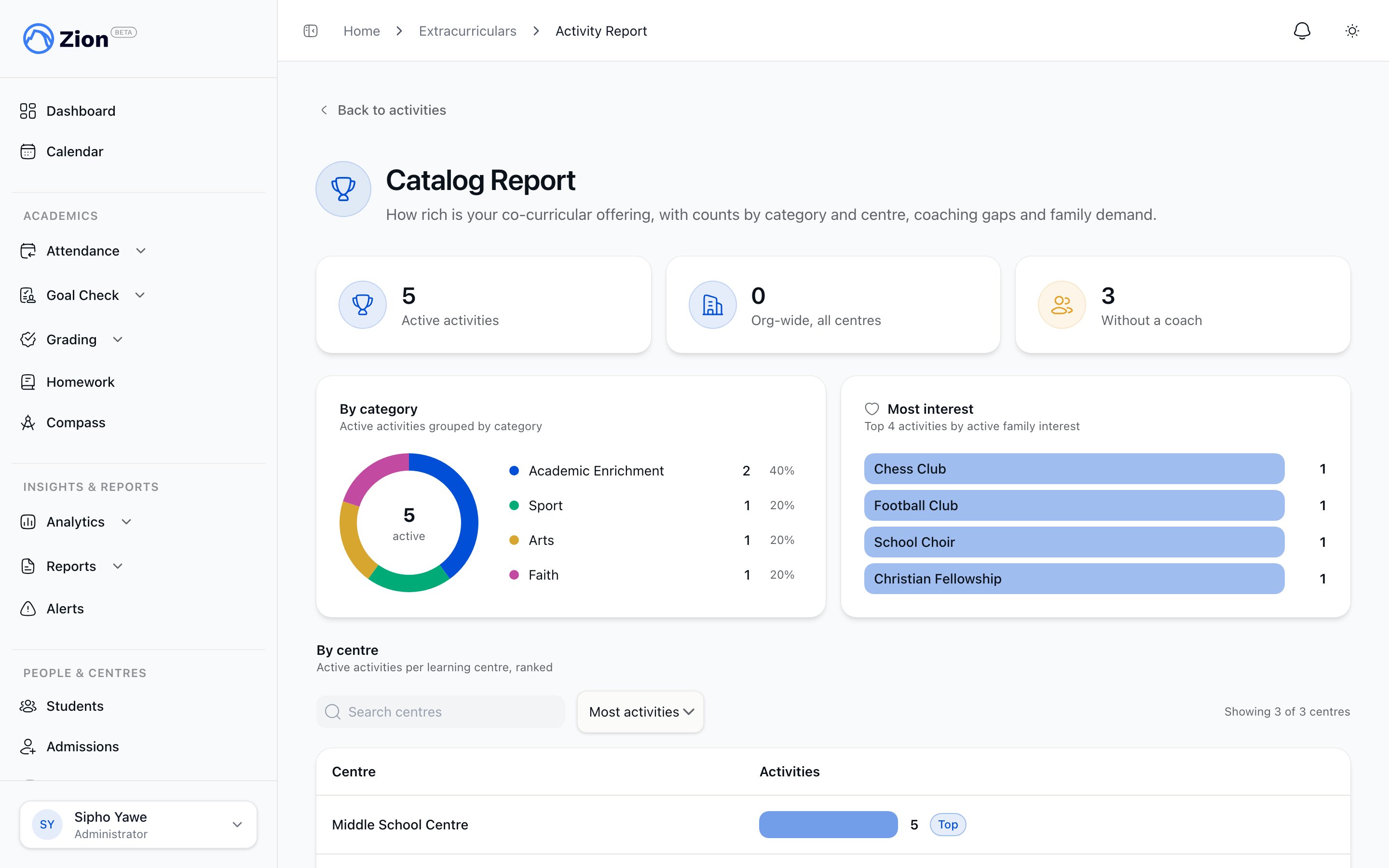
A rollup report of family interest across activities
For creating, scoping, and archiving activities themselves, see Managing the catalog.
Family interest
Anyone signed in to your school’s Zion account can register interest in an active activity from the catalog. In practice this is parents and students.- A parent can optionally attach one of their own children using the “For (optional)” child picker on the activity card. Only children with an accepted parent-child link can be selected.
- A student’s interest is tied automatically to their own student record. There is no child picker for a student.
- Any other caller can register general interest with no child attached.
1
Open Activities
Parents open Activities from the sidebar. Students open Activities from the top navigation, scoped to org-wide activities plus their own learning centre.
2
Choose a child (parents only)
On an activity card, optionally select a child from the “For (optional)” dropdown before registering.
3
Register interest
Click Register interest. The person in charge and school administrators are notified.
4
Withdraw if needed
Click Withdraw interest on the same card to retract. You can register again later.
Interest visibility for staff
Administrators see a per-activity active-interest count directly on the catalog table on the Manage Activities page. Clicking that count opens a read-only drawer listing every requester for the activity: name, optional child name, status (interested or withdrawn), and registered date. There are no accept or reject controls in this drawer, because interest is not enrolment.Self-service for the person in charge: Activities I run
Any staff member assigned as the person in charge of an activity (administrator, supervisor, or monitor) gets a personal view called Activities I run, reachable from the staff catalog page. It lists every activity where they are the assigned person in charge, including archived ones, which are badged as archived. From this view the person in charge can edit only:- Schedule summary
- Recurrence preset, selected weekdays (for weekly selected), start time, and duration
1
Open Activities I run
From the staff catalog page, open Activities I run.
2
Select an activity
Choose an activity where you are the assigned person in charge.
3
Update the schedule
Edit the schedule summary and, if the activity has a calendar recurrence, its preset, weekdays, start time, or duration.
4
Save
Only the schedule and recurrence fields change. Name, category, person in charge, centre scope, and active status stay untouched.
Catalog Report
Administrators (org-wide) and supervisors (their own learning centres) can open the Catalog Report from the catalog page for an aggregate view of the catalog.
The most-interest section is left out if interest data is unavailable, rather than showing an error.
1
Open the report
From the catalog page, open Report.
2
Review totals
Check the active count, the breakdown by category, and the breakdown by learning centre.
3
Check for coverage gaps
Look at the count of activities without a person in charge to find ones that need someone assigned.
4
Review demand
Scan the top 5 activities by active interest count to see where family demand is concentrated.
Extracurriculars overview
What extracurriculars are in Zion and who sees what.
Managing the catalog
Creating, scoping, and archiving activities.
Calendar overview
How recurring activities appear on the school calendar.
ICS subscription
Subscribing to the calendar feed, including extracurricular events.