

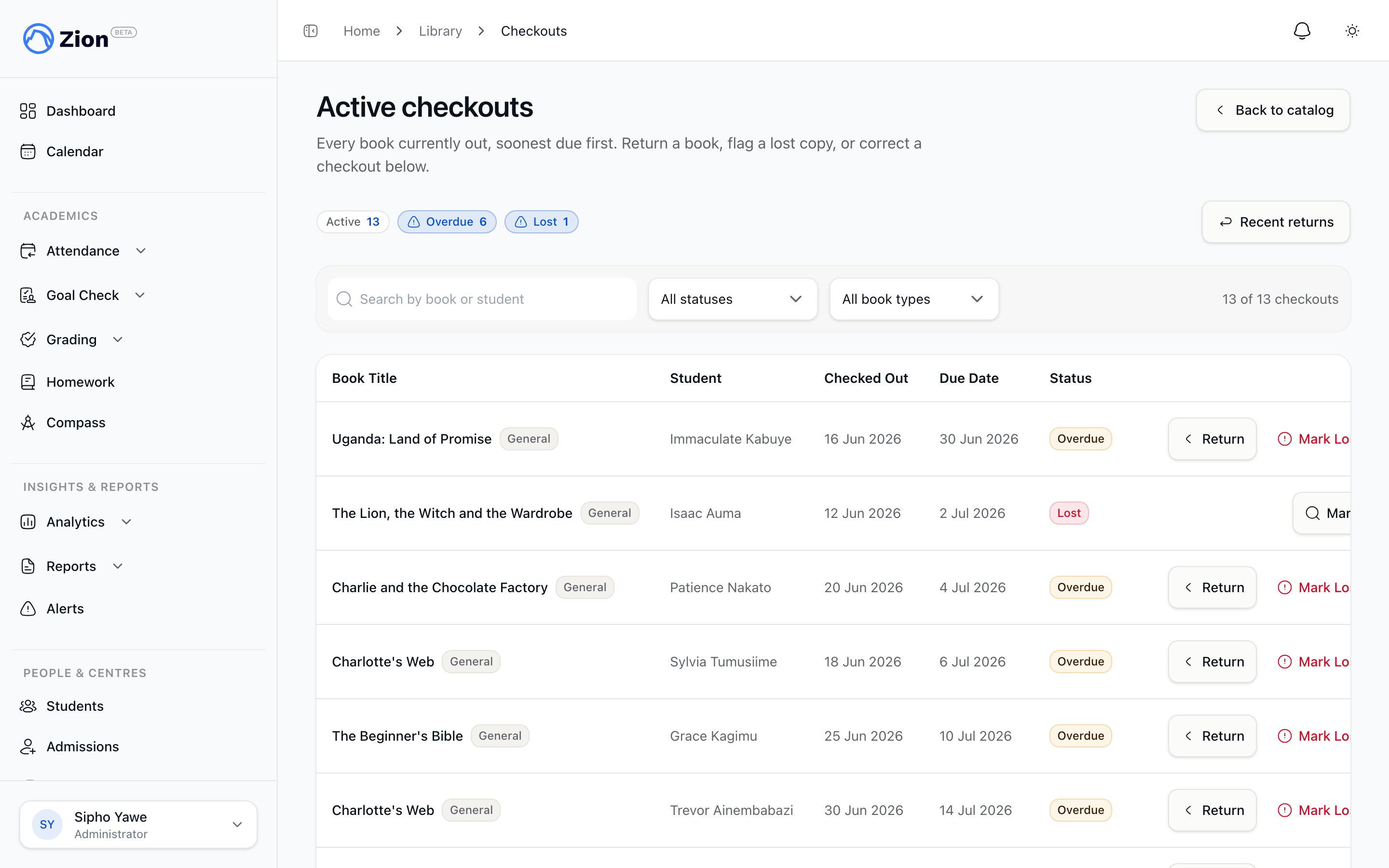
Overdue and lost flags on the active checkouts list
How “overdue” is determined
A checkout’s status is computed live, not stored as a static flag. For a General book, Zion compares the due date to the school’s local end-of-today. Once that moment passes and the book has not been returned, the checkout shows as Overdue. PACE Required checkouts carry no due date, so they never enter this state.Status shown on the catalog and active-checkouts screens (Out, Overdue, Lost, Returned) reflects the live comparison. The daily sweep below is what turns an overdue checkout into a notification, not what determines the status itself.
The daily overdue sweep
Once a day, Zion automatically checks every General checkout across the organization:1
Find overdue, unreturned checkouts
The check looks for General checkouts whose due date has passed the school’s local end-of-day, that are still checked out (not returned), and that have not already been flagged as late.
2
Flag the checkout
The checkout is marked late. If the check happens to run more than once, only the first run flags a given checkout, so a family is not notified twice for the same overdue book.
3
Notify staff and the parent
A late-return notification goes to everyone holding the Manage capability at the school, to the staff member who originally checked the book out, and to the student’s linked parent(s).
Marking a book lost
Staff mark a book lost from the same row where it would otherwise be returned.1
Open Active Checkouts
Go to the library desk (administrators use Catalog and Checkouts under Programs & Resources, supervisors use the combined Library page) and find the checked-out book.
2
Select Mark Lost
This action is available only for General books. A PACE Required checkout does not offer it, since custody-only loans cannot be lost in the system.
3
Confirm in the dialog
The confirm dialog states that no billing occurs. Marking a book lost does not charge the family.
The Return action disappears from a row once it is marked Lost. To close it out, use Mark Found.
Marking a lost book found
A lost row offers a Mark Found action with two outcomes:
Each outcome writes the exact inverse of whatever the loss recorded, so stock counts stay accurate. Attempting to mark a checkout found when it is not currently lost is rejected.
What staff and parents each see
Non-administrator staff (supervisor, monitor) only see checkouts for students in their assigned learning centre(s). A supervisor or monitor with no centre assignment sees none.
What a family should expect
If a book shows Overdue, the family receives a notification and can return it at any time. If it is a General book already past its due date, staff will flag the return as late automatically when it comes back. If a book is marked Lost, the family is notified and no charge is applied. Contact the school directly to resolve either case, since parents cannot return, cancel, or edit a checkout themselves.Checkout and return
How staff check a book out, return it, and correct a mistaken checkout
Library overview
Catalog, book types, and who can access the library desk
Your child's progress
Where library checkouts fit alongside a parent’s other views of their child
Notifications overview
How queued notifications like late-return and lost-book alerts get delivered