

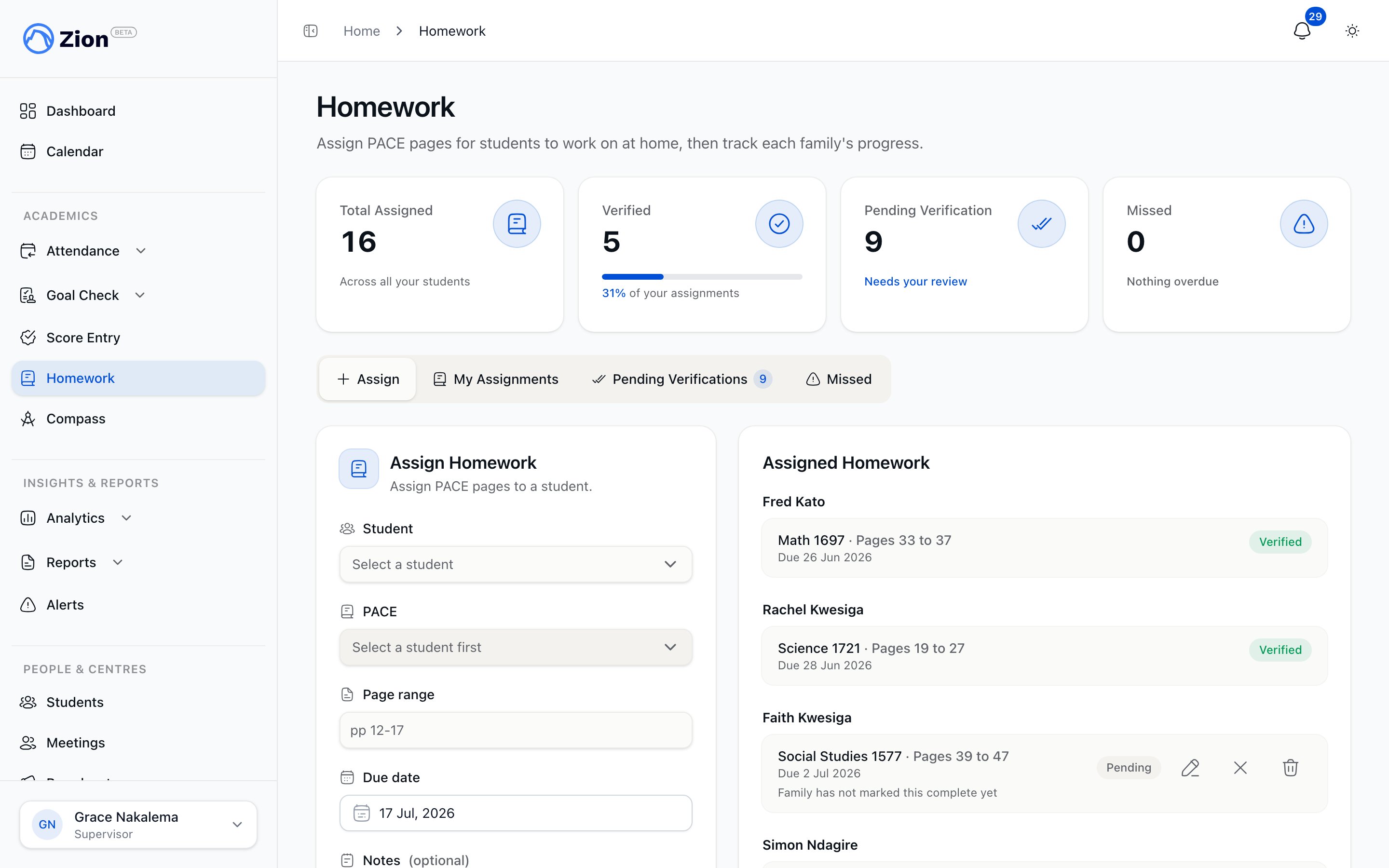
The homework assignment screen with a student's page range and due date.
Who does what
- Supervisor and monitor
- Administrator
- Parent
- Student
Assign a page range to a student, review pending verifications, verify completed work at goal check, cancel or excuse an assignment that no longer applies, and check a Completion Report tab that summarizes how their own students are doing. Supervisors and monitors only see students in the learning centres they are assigned to.
The lifecycle
An assignment moves through a small set of statuses. Two of them, cancelled and excused, are deliberately neutral rather than a mark against the student.Cancelled and excused items are never counted as missed. A supervisor or monitor can withdraw an assignment this way at any point before it is verified, including after it has already been flagged missed.
Assigning a page range
A supervisor or monitor picks one student, one of that student’s active PACEs, a page range (up to 100 characters, for example “pp 12-17”), a due date, and optional notes for the family (up to 500 characters). The due date defaults to the next school day: Zion computes tomorrow in the school’s timezone, then skips Saturdays, Sundays, and any all-day holiday on the org’s calendar. Staff can move the due date later but not earlier than today. The due date is also mirrored onto the shared school calendar. Only one assignment can exist per student per PACE per due day. Trying to create a duplicate is rejected.Families mark it done, staff verify it
A parent or the student marks a pending item done from home, optionally leaving a short note (up to 280 characters) for the teacher. That flips the item to Parent Done and notifies the assigning teacher. If the family taps Mark Done by mistake, they can undo it back to Pending at any time before the teacher verifies it. At goal check, the supervisor or monitor works through the Pending Verifications list, oldest due date first, and confirms each item:- Verify, when the family already marked it Parent Done and the student shows the completed pages.
- Mark done unilaterally, when the family never marked it but the work is done, for example when a parent is unreachable. This moves Pending straight to Verified.
- Verify (late), for an item already flagged Missed that the student completed after the due date. This is recorded as a late verification so the completion report can distinguish it from on-time completions.
What the daily jobs do
Two scheduled jobs keep homework status current without staff having to check manually:- A daily sweep moves every assignment still Pending past its due date into Missed, and notifies the assigning teacher and the family.
- A separate daily job sends a due-soon reminder to the family and the student for anything still Pending and due that day. It does not change the assignment’s status.
Cancel or excuse
Cancel or excuse withdraws an assignment neutrally, before or after it has been flagged Missed, as long as it hasn’t already been verified. Staff choose Cancel when the assignment no longer applies, or Excuse when the student had a legitimate reason not to complete it. Both render as a neutral status, never as a missed mark, and staff can add an optional reason.Completion report
Zion also rolls up homework standings per student: how many pages were assigned, verified, verified late, missed, or cancelled and excused, over a date range. A student is flagged Chronic when their missed rate reaches 30% or higher over the window being viewed. What you see depends on your role. Administrators open Homework from the sidebar and land straight on the full report, covering every learning centre in the organization with a date range they control. Supervisors and monitors see a shorter summary on a Completion Report tab inside their own Homework page, covering the last 30 days for the students in their assigned centres.Assigning and verifying homework
The Assign, My Assignments, Pending Verifications, and Missed tabs in detail.
Homework Completion Report
Reading the KPI cards, the per-student table, and the Chronic flag.
Goal Check overview
Homework verification happens alongside PACE goal checks.
Notifications overview
How homework alerts and reminders reach families and staff.